Chrome extension · Free & open source
Export your WhatsApp chats to text files
Chat Exporter saves conversations from WhatsApp Web as plain .txt files on your own computer — whole histories, not just what fits on screen. Formatted so you can hand them straight to an AI.
Ada LovelaceAre we still on for Thursday?
Yes — 10:30 at the studio
Ada LovelacePerfect, sending the brief over now
[12/25/2024 10:31] Ada Lovelace: Are we
  still on for Thursday?
[12/25/2024 10:32] Me: Yes — 10:30 at
  the studio
[12/25/2024 10:34] Ada Lovelace: Perfect,
  sending the brief over now
What it's for
Years of conversation, in a format anything can read
WhatsApp keeps your messages locked inside its own app. Plain text sets them loose: paste a thread into an AI assistant, search a decade of messages with the tools you already use, or keep a readable archive that outlives any one piece of software.
Not just what's on screen
The exporter scrolls back through each conversation, loading older messages as it goes, and collects everything it finds along the way.
Every chat in one run
Scan your chat list, tick the conversations you want, and leave it running. One file per chat, or a single combined file for one-shot AI ingestion.
No server, ever
The extension makes no network requests at all. It reads the page in front of you and writes files to your Downloads folder. Nothing else.
Sender, date and time on every line
Each message keeps its author and timestamp, so an AI reading the file can follow who said what, and when.
Machine-readable output
Export .json alongside the text, with parsed timestamps and message direction, when you want to script against the data.
Read every line
The whole extension is a handful of readable files on GitHub. No build step, no bundled dependencies, no remote code.
How it works
Three steps, then leave it running
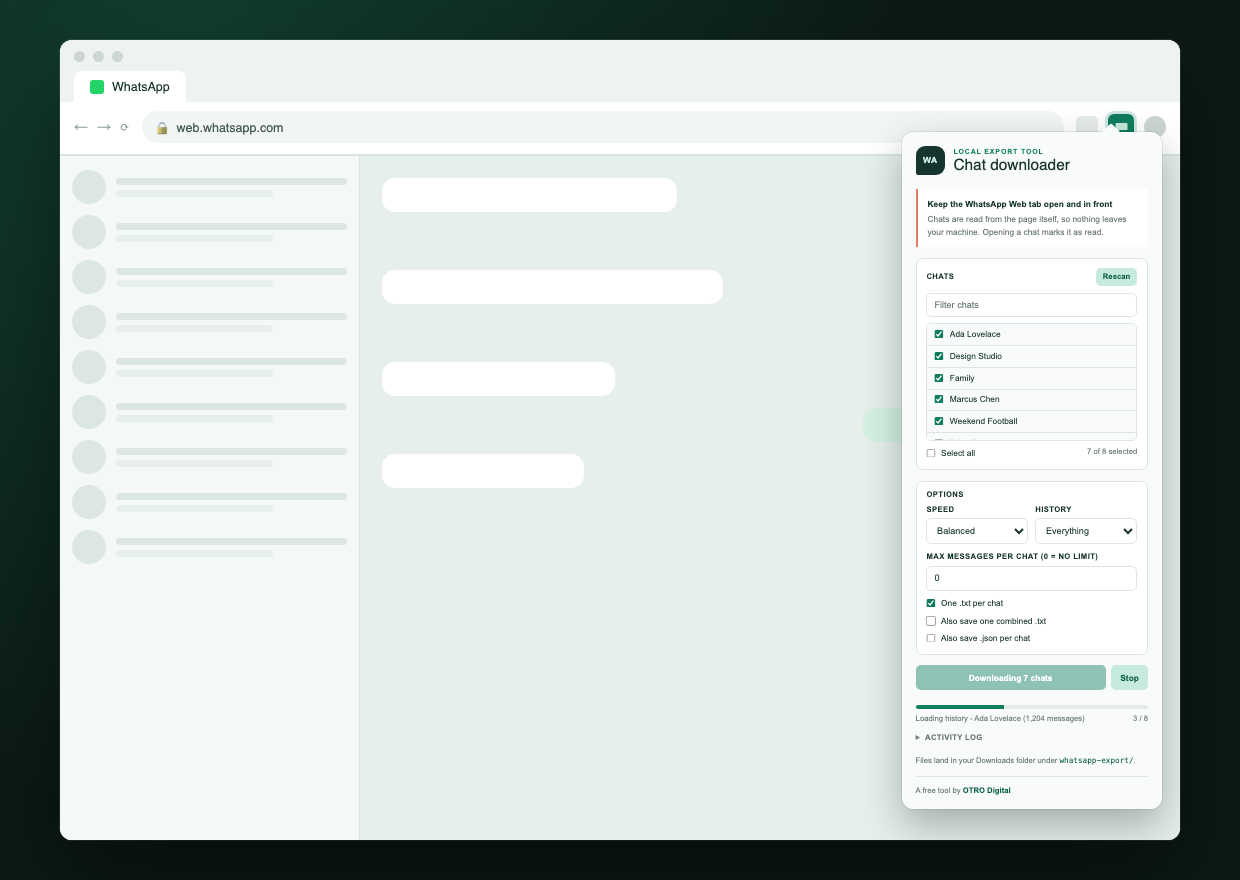
Open WhatsApp Web and click the extension
Sign in to web.whatsapp.com as usual. The extension only ever has access to that one site.
Scan your chats and pick the ones you want
Scanning lists every conversation in your sidebar. Filter it, tick what you need, or skip straight to exporting everything.
Press download and let it work
Each chat opens, scrolls back through its history, and is written to Downloads/whatsapp-export/. You can close the popup; the export keeps going.
The output
One readable file per conversation
Every file opens with a header describing what it contains, then one line per message. Dates are reproduced exactly as WhatsApp displayed them — and the header states which order they're in, so nothing has to guess whether 03/04 means March or April.
================================================================
WhatsApp chat export
Chat: Ada Lovelace
Messages: 1204
Range: 03/14/2023 09:02 -> 09/07/2026 18:41
Date format: MM/DD/YYYY (as displayed by WhatsApp)
Exported: 2026-09-07T18:42:03.918Z
================================================================

[12/25/2024 10:31] Ada Lovelace: Hello there
[12/25/2024 10:32] Me: Hi! How did the talk go?
[12/25/2024 10:33] Ada Lovelace: <image omitted> here's the room
[12/25/2024 10:35] Me: (replying to: Hello there) still around?
[12/25/2024 10:40] * Messages and calls are end-to-end encrypted.
Privacy
It cannot leak your messages, because it never sends them anywhere
This isn't a promise about how carefully data is handled on a server. There is no server. The extension has no code that opens a network connection, which you can verify yourself by reading the source — it is a few hundred lines of plain JavaScript.
Install
Load it in about a minute
Download the latest release from GitHub, then load it as an unpacked extension.
Download and unzip the latest release
Grab the zip from the releases page on GitHub and unzip it somewhere you'll keep it.
Open chrome://extensions and turn on Developer mode
The toggle sits in the top-right corner of the page.
Click "Load unpacked" and choose the folder
Chrome loads the extension straight away; its icon appears in your toolbar.
Open WhatsApp Web and start exporting
Sign in, click the extension icon, and scan your chats.
Worth knowing first
What it doesn't do
Opening a chat marks it as read
The exporter clicks through conversations exactly as you would, so unread badges clear and read receipts are sent where you have them switched on. Export a small selection first if that matters to you.
Media isn't downloaded
Images, audio, video and documents appear as placeholders such as <image omitted>, matching the convention WhatsApp uses in its own exports. Captions are kept.
Long histories take time
Loading years of messages means scrolling back through the whole conversation. Several minutes per large chat is normal, which is why there are caps for message count and date range.
Archived chats are skipped
Only conversations in your main sidebar list are exported.
WhatsApp can change its markup
The exporter reads the page's structure, so a redesign on WhatsApp's side can break it until the extension is updated. It reports a clear error rather than writing an empty file.
Questions
Frequently asked
Is it free?
Yes. It's free and open source, with no paid tier, and the full source is on GitHub for anyone to read or modify.
Do my messages get uploaded anywhere?
No. The extension makes no network requests at all. It reads the conversations already displayed in your browser and writes files to your own Downloads folder. There is no server involved at any point.
How is this different from WhatsApp's own export?
WhatsApp can email you one conversation at a time from your phone. This exports many conversations in a single run, straight to files on your computer, in a consistent format with a header describing each file's contents.
Can I use the exported files with ChatGPT or Claude?
That's what the format is designed for. Each line carries the sender, date and time, so an AI can follow the conversation. There's also an option to write every chat into a single combined file for pasting or uploading in one go.
Does it export group chats?
Yes. In group conversations each message keeps the name of the person who sent it, exactly as WhatsApp displays it.
Will it download my photos and voice notes?
No. Media files are not saved. They appear in the text as placeholders such as <image omitted> or <audio omitted>, with any caption preserved.
Does it work on Firefox or Safari?
Not currently. It's built for Chrome and Chromium-based browsers such as Edge, Brave and Arc, and needs Chrome 102 or later.
Is this made by WhatsApp?
No. It's an independent tool from OTRO Digital, and is not affiliated with, endorsed by, or sponsored by WhatsApp LLC or Meta Platforms, Inc.
Who made this
OTRO Digital
Chat Exporter is a free, open-source tool from OTRO Digital, released for anyone who wants their conversations back in a format they control.